January 13th, 2026
User Feedback Integration: Best Practices
Collect user feedback early—interviews, usability tests, and surveys—to spot issues, centralize insights, prioritize by impact, and iterate faster.
Warren Day
Skipping user feedback during development is a costly mistake. Fixing issues after launch can cost up to 100x more than addressing them early. Testing with just 5 participants can reveal 85% of usability problems, saving time and money. The key is to gather feedback early and often, using methods like interviews, usability testing, and surveys.
Key Takeaways:
- Why Feedback Matters: It validates desirability, viability, and feasibility while preventing costly post-launch fixes.
- Effective Methods:
- Interviews: Understand user motivations and frustrations (5-10 participants).
- Usability Testing: Identify friction points in prototypes (5-8 per group).
- Surveys: Gather trends and satisfaction data from larger audiences.
- Organizing Feedback: Centralize data, tag by feature, user type, and feedback type (e.g., pain points, feature requests).
- Prioritizing Feedback: Focus on frequency, impact, and feasibility using tools like RICE or Impact vs. Effort matrices.
- Avoid Pitfalls: Recruit the right audience, time feedback requests well, and avoid relying solely on anecdotal data.
Quick Tip:
Act on feedback quickly and share updates with users to build trust and loyalty. Tools like LaunchSignal can streamline this process by integrating surveys and analytics into your workflow.
Why User Feedback Matters for Prototyping
Prototyping without user input is like navigating without a map - your team might think a feature is straightforward, but users often experience it very differently. Chris Roy, Former Head of Product Design at Stuart, captures this perfectly:
"It's worth going to the lengths of creating a prototype if you have a hypothesis to prove or debunk".
This highlights why feedback is essential to avoid costly mistakes.
User feedback helps validate your assumptions through fake door testing before committing significant resources. Fixing issues during the prototyping phase is far less expensive than addressing them post-launch. It’s during this stage that feedback often reveals what are known as critical design gaps - problems like a checkout button that’s hard to find or navigation that confuses users. These might seem obvious once identified, but they’re easy to miss when you’re too close to the design. If these gaps make it to production, they can directly affect your bottom line.
Feedback also brings clarity to internal disagreements. When your team is split on whether a new feature will resonate with users, testing it with real users provides a clear answer. This approach moves decisions away from assumptions and ensures you’re creating something people will actually use - not just something that looks impressive in a design review.
The best part? Gathering feedback doesn’t require a massive investment. Testing with just 5 participants can uncover 85% of usability issues. Early feedback is one of the smartest, most efficient moves you can make during development.
sbb-itb-9a9c51d
Best Practices for Collecting Feedback
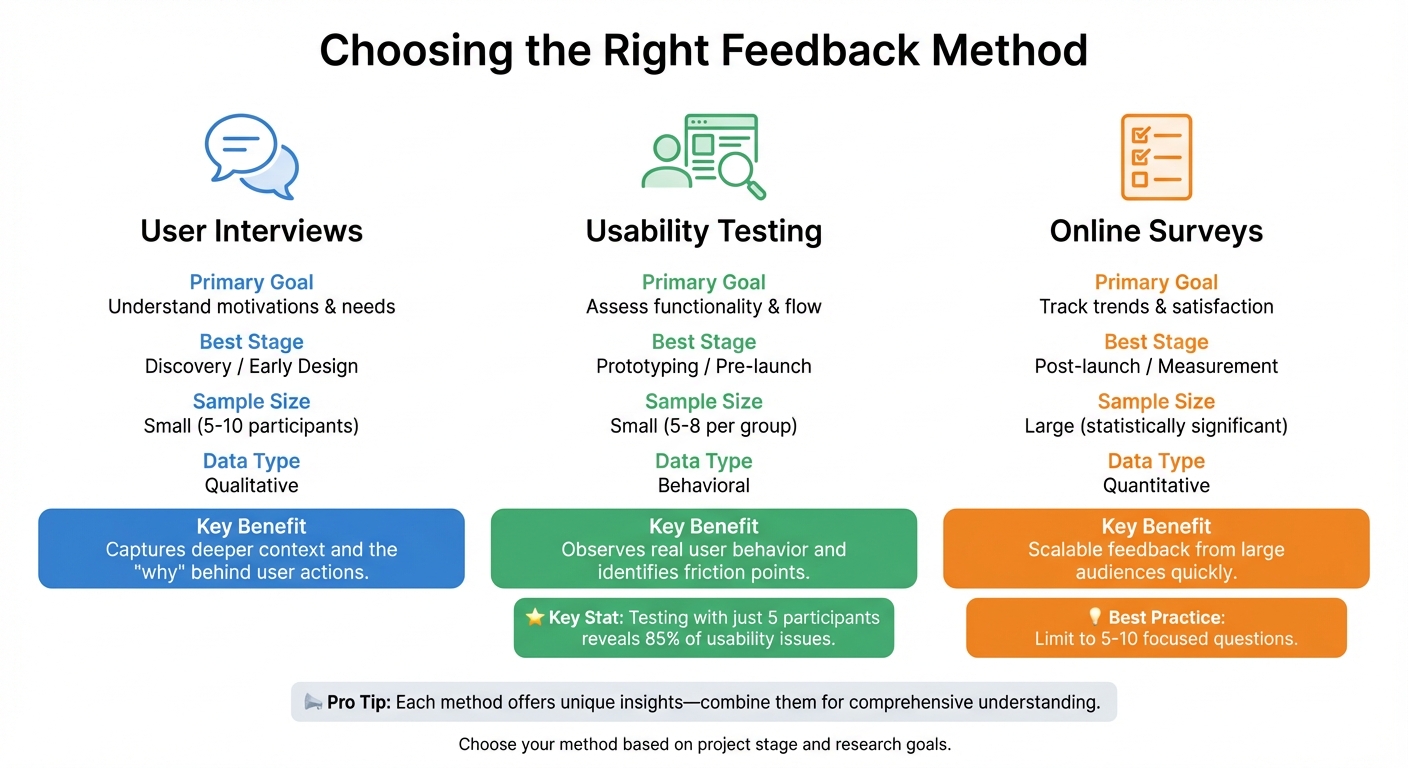
User Feedback Methods Comparison: Interviews vs Usability Testing vs Surveys
Gathering feedback effectively depends on choosing the right method for your goals and the stage of your project. For instance, user interviews are ideal for uncovering the "why" behind user actions - exploring motivations and frustrations before anything concrete is developed. On the other hand, usability testing helps you observe real user behavior with prototypes, identifying friction points that might otherwise go unnoticed. Meanwhile, online surveys are great for validating trends across a larger audience, though they lack the depth of qualitative insights.
Here’s a quick comparison of these methods:
| Method | Primary Goal | Best Stage | Sample Size | Data Type |
|---|---|---|---|---|
| User Interviews | Understand motivations & needs | Discovery / Early Design | Small (5-10) | Qualitative |
| Usability Testing | Assess functionality & flow | Prototyping / Pre-launch | Small (5-8 per group) | Behavioral |
| Online Surveys | Track trends & satisfaction | Post-launch / Measurement | Large (statistically significant) | Quantitative |
Each method offers unique insights, so let’s break them down further.
Conduct User Interviews for Detailed Insights
User interviews are perfect for capturing the deeper context that surveys often miss. A semi-structured approach works best, allowing you to dig into specific topics while staying flexible enough to follow interesting threads. For example, Autotrader.com learned through interviews that many users begin their car-buying journey outside their platform.
When conducting interviews, focus on understanding rather than pitching your design. If you explain features or defend your decisions, you might end up with polite but unhelpful feedback. A technique like the "I Like, I Wish, What If" framework can guide participants to share honest and actionable insights.
After gathering this foundational understanding of user motivations, move on to usability testing to see how users interact with your prototype.
Use Usability Testing to Validate Prototypes
Usability testing helps you observe how users interact with your design in real time. Watching users complete tasks can quickly reveal issues that surveys or interviews might miss. For instance, Code for America’s ClientComm study uncovered significant design flaws when testing with users who were more familiar with older technologies.
One effective approach is the "think-aloud protocol", where participants verbalize their thoughts as they navigate your prototype. Comments like, "I expected the save button here, but now I’m confused", can pinpoint exactly where the design falls short. To make participants feel at ease, emphasize that you’re testing the design - not their abilities. This helps reduce self-consciousness and ensures more candid feedback.
Deploy Online Surveys for Scalable Feedback
Online surveys are your go-to method for gathering feedback from a large group quickly. To keep participants engaged, limit surveys to 5-10 focused questions. These are particularly useful for measuring satisfaction, tracking key metrics, or gauging design preferences, rather than digging into complex behaviors.
If you’re still in the early stages of validating an idea, tools like LaunchSignal can simplify the process. Embedding targeted questions directly into a landing page allows you to collect insights on user preferences and pain points without the hassle of managing separate survey platforms. This approach delivers scalable, quantitative data while keeping things efficient.
Stick to metrics that can drive clear, actionable decisions.
How to Organize and Prioritize Feedback
Once you've gathered feedback, the next step is to organize it so you can uncover actionable insights. Keeping all feedback centralized in one place - like Jira, Notion, or Dovetail - helps avoid data silos and makes planning your roadmap much easier.
To streamline organization, tag each piece of feedback with three key attributes: the related feature area (e.g., checkout flow or onboarding), the specific user segment (such as high-value customers, new users, or churned accounts), and the signal type. Signal types generally fall into four categories: feature requests (what users want), pain points (issues that frustrate or block users), usage insights (how users interact with your product, including workarounds), and competitive intel (what users appreciate about competitors). This tagging system makes it easier to spot recurring patterns and identify common challenges across user groups.
When it comes to prioritizing feedback, focus on balancing three factors: frequency, impact, and feasibility. For instance, a high-impact issue like a security bug should take priority over frequent but minor concerns, such as adjusting a color scheme. Frameworks like RICE (Reach, Impact, Confidence, Effort) or an Impact vs. Effort matrix can help you evaluate feedback objectively, removing the guesswork. A great example of a "quick win" might be fixing a confusing button label that affects thousands of users but requires minimal development time.
Popular Methods for Organizing and Prioritizing Feedback
| Method | Use Case | Scalability | Key Benefits |
|---|---|---|---|
| Affinity Mapping | Grouping large volumes of notes or quotes | Low (Manual) | Quickly identifies patterns and clusters related themes |
| 2x2 Matrix | Prioritizing tasks by Impact vs. Effort | High | Offers clear guidance on "quick wins" versus long-term projects |
| Thematic Analysis | Analyzing interviews or open-ended survey data | Medium | Digs deeply into user motivations and recurring concerns |
| Feedback Capture Grid | Breaking down test notes into Likes, Criticisms, Questions, and Ideas | Medium | Ensures a balanced view of positive and negative feedback |
Lastly, close the loop with users. When you act on their feedback and implement changes, let them know. This creates a positive cycle where users feel heard and are more likely to share thoughtful feedback in the future. In fact, 83% of customers say they feel more loyal to brands that respond to and resolve their concerns. Prioritizing feedback isn’t just about solving problems - it’s about showing users that their input makes a difference. This structured approach ensures that every iteration of your product is driven by clear, well-prioritized user insights.
Integrating Feedback into Prototyping Cycles
Once you've organized and prioritized feedback, the next step is weaving it into your development cycle. This approach ensures that each iteration improves upon the last. In fact, early user testing has been shown to cut iteration cycles by 25% and boost revenue growth by 32%. By embedding feedback into every sprint, teams can shift from subjective debates to objective learning. Here's how to make feedback a core part of your process instead of an afterthought.
Set Up Regular Feedback Review Cycles
Consistency is key when it comes to reviewing feedback. Scheduling these reviews every one to four weeks works well for most teams. This regular rhythm keeps feedback manageable and prevents it from piling up. During these sessions, gather input from all sources, synthesize it, and plan actionable updates. Acting quickly on this feedback helps avoid getting bogged down in over-analysis.
To streamline the process, centralize feedback using tools like Productboard or Canny. This ensures everyone on the team has clear access to user insights, fostering collaboration and avoiding the pitfalls of isolated testing. Chris Roy, Former Head of Product Design at Stuart, has stressed the importance of avoiding these silos.
Prioritize High-Impact Changes First
Not every piece of feedback demands immediate action. Focus on changes that benefit a larger user base and align with your business goals. Weigh their potential impact against the resources required to implement them. Tools like LaunchSignal can help identify data-driven priorities that deliver the most value.
An Impact vs. Effort matrix can also help you decide what to tackle first. For example, a simple fix like clarifying a confusing button label - especially if it affects thousands of users - should take precedence. On the other hand, a feature request that benefits only a small group and requires extensive engineering can be deferred. Once you've made these high-impact updates, validating their success is crucial.
Test and Validate Updated Prototypes
After integrating changes, it's time to test your updated prototypes to ensure they hit the mark. A great way to do this is by presenting users with both the old and updated versions for preference testing. This can uncover which design choices resonate and why.
Set clear, measurable goals for each testing cycle. Instead of vague objectives like "improve the checkout experience", aim for specific outcomes such as "reduce checkout abandonment by 10%" or "enable users to complete a hotel booking in under three minutes". Testing with just five participants can uncover about 85% of usability issues, giving you confidence that your iterations are making meaningful improvements.
Common Pitfalls and How to Avoid Them
Once you've organized and integrated feedback into your prototyping cycles, keep an eye out for these common mistakes that can compromise your results.
Recruiting the wrong audience can completely derail your efforts. If your testers don’t align with your target persona, the data you gather won’t reflect the needs of your actual users. Be meticulous about selecting participants who match your intended audience as part of your pre-launch validation.
Another misstep is poor timing when requesting feedback. If you interrupt users with popups before they’ve completed a task, you’ll likely end up with unhelpful responses. Follow the "task, then ask" rule - wait until users finish an action before asking for their input. Keep surveys short and sweet: aim for less than a minute or about four questions. Also, let users know upfront how much time they’ll need to commit. These timing missteps can snowball into other challenges in gathering meaningful feedback.
Social desirability bias is another tricky issue. People often give overly polite answers, saying everything is "fine" even when they’ve faced challenges. To get more actionable feedback, ask direct questions like, "What’s one thing you would improve about this?". This approach encourages users to pinpoint specific areas for improvement instead of glossing over problems. Caitlin Goodale, Principal UI/UX Designer at Glowmade, highlighted this issue:
"Things that seemed clear to us on the product team were often totally incomprehensible to real users".
Testing in isolation is another pitfall to avoid. As Chris Roy, Former Head of Product Design at Stuart, pointed out:
"Testing done in a vacuum is useless. Distill the best parts of research and make sure everyone from sales to marketing to engineering knows all the interesting things you just found out".
To address this, centralize your feedback in one place and share insights across teams. Use tools with intuitive analytics to make this process seamless.
Finally, don’t fall into the trap of relying only on anecdotal feedback. Combine qualitative data, like interviews and surveys, with quantitative tools such as heatmaps to validate trends. By triangulating data from multiple sources, you’ll avoid overreacting to one-off comments and instead focus on patterns that truly matter. This balanced approach ensures your decisions are rooted in reliable insights.
Conclusion
Listening to your users is the cornerstone of creating products that truly connect with them. Addressing issues during development is far more cost-effective - fixing them post-launch can be up to 100 times more expensive.
Start gathering feedback early through interviews and surveys. These methods uncover not just user motivations but also tangible challenges they face. Keep all feedback in one central location, prioritize changes based on their impact on users and your business objectives, and iterate quickly to stay ahead.
Avoid common mistakes like recruiting the wrong participants, testing in isolation, or relying only on anecdotal evidence. Instead, follow the best practices shared here to ensure your feedback process is effective. As David Kelley, Founder of IDEO, wisely advises:
"Fail faster, succeed sooner".
This philosophy of rapid iteration and learning allows you to validate a product idea early, catch design flaws before they escalate, and safeguard your bottom line.
Tools like LaunchSignal make this process even more efficient. With features like instant landing page templates, email capture, questionnaires, and analytics dashboards, you can test multiple concepts at once and make informed, data-driven decisions.
FAQs
What’s the best way to prioritize user feedback during development?
Prioritizing user feedback is all about transforming insights into meaningful changes that benefit both your users and your business. Start by gathering feedback at every stage of development - from the initial discovery phase to prototype testing. To make sense of the data, segment feedback by user type, behaviors, or specific pain points. Collect feedback promptly, while experiences are still fresh, to ensure accuracy and relevance.
To decide what to act on first, use scoring models like Impact × Effort or RICE. These frameworks help you rank feedback based on factors like user impact, alignment with your business objectives, and the effort required to implement changes. For a deeper dive, qualitative methods like interviews or usability testing can provide valuable context and even reveal needs you might have overlooked.
Keep the process dynamic by regularly revisiting and updating your priorities. Tools like LaunchSignal can be invaluable for gathering real-time data - like email sign-ups or survey results - and tracking engagement metrics. This ongoing feedback loop ensures your roadmap stays focused on what truly matters to your users, allowing you to stay agile and responsive.
What are the best ways to collect user feedback at different stages of a project?
Collecting user feedback requires a thoughtful approach that aligns with your project's stage. In the early concept phase, it's all about understanding your audience. Qualitative methods like user interviews and open-ended surveys can uncover motivations and pain points. You might also set up a simple landing page to gauge interest - look for signals like email sign-ups or responses to a brief questionnaire.
As your project moves to the prototype stage, usability testing takes center stage. Watching users interact with your design - whether through moderated sessions or remote testing - can reveal where they struggle. Following up with surveys helps prioritize which issues to address first.
In the development and pre-launch phase, feedback becomes more contextual. In-product prompts or beta testing programs allow you to gather insights directly from users engaging with your product. Simulated experiences, like fake checkouts, can surface concerns such as pricing without requiring a fully functional backend. Once your product is live, keep the feedback loop going. Short surveys and analytics can help track user satisfaction and identify areas for improvement.
By tailoring your feedback methods to each phase, you ensure the insights you gather are not just informative but also actionable, driving better results throughout your product's lifecycle.
What are the best ways to avoid mistakes when using user feedback in the design process?
To effectively integrate user feedback into your design process, start by defining clear goals and success metrics. Without a structured approach, feedback can quickly become scattered and lose its value. Make sure to recruit a representative sample of users - not just the easiest ones to access - and collect feedback early and consistently to avoid costly, last-minute design changes.
When running usability tests, keep the sessions small (around 5–10 participants). This size is ideal for spotting significant issues without overwhelming your team. Use methods like think-aloud protocols, where participants verbalize their thoughts as they interact with your design. Avoid asking leading or confusing questions that could skew responses. Treat the feedback as data - record sessions, look for recurring themes, and prioritize findings based on your business objectives rather than reacting to every individual comment.
To make this process smoother, tools like LaunchSignal can be incredibly helpful. With it, you can create landing pages, embed questionnaires, and capture user actions like email signups or even simulated checkouts. Its real-time analytics let you validate ideas early and measure how design changes perform. This ensures that feedback directly informs your decisions while keeping the process efficient and focused.
Start validating ideas in minutes not days
Create high-converting landing pages. Test with real users. Get purchase signals. Know what to build next.
Visit LaunchSignal